

Selecting Priority when Submitting Tickets to Madhive
One of the first values to associate when submitting new tickets to the Madhive Team for Support or Product Feature requests is “Priority”.
Priority has four different level options to choose from which are each dependent on the severity of what is being requested or reported:
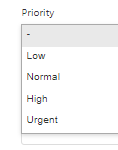
- Low - This Priority level value can be assigned for a request or question on something not needed to be tended to for weeks.
-
- An example of this would be “Can we please change the color of the header shown atop the Pacing screen?”
- An example of this would be “Can we please change the color of the header shown atop the Pacing screen?”
- Normal - The Priority level most commonly selected, for common requests and questions that aren’t about revenue stopping activity.
-
- An example would be to request that a new Segment for people interested in Fiat cars be created for a future Campaign to deliver to.
- An example would be to request that a new Segment for people interested in Fiat cars be created for a future Campaign to deliver to.
- High - Please reserve High level priority for something that would be preventing immediate workflow and potentially revenue.
-
- An example of a High priority issue to report would be to let us know that a user is having issues getting a Campaign Live when it needs to go live ASAP.
- An example of a High priority issue to report would be to let us know that a user is having issues getting a Campaign Live when it needs to go live ASAP.
- Urgent - This can be used when the Madhive platform is down or for when issues arise related to high impact Campaigns.
-
- “All of our Planners are unable to get into the system to book Campaigns.”
Comments
0 comments
Please sign in to leave a comment.